
The 2026 State of Web Graphics: PNG Is Out, AVIF and SVG Are In
Legacy PNG and JPEG are quietly being replaced by AVIF, WebP, and inline SVG. A data-driven look at why the migration is happening, how the formats actually differ at render time, and what to ship in 2026.
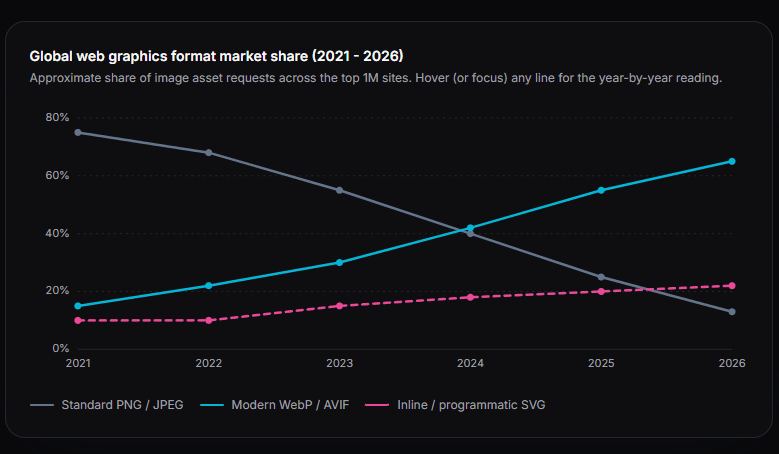
Five years ago, almost three out of every four images shipped to a browser was a PNG or a JPEG. Today, on the same sample of top-traffic sites, that share has fallen below one in seven. The replacements - AVIF, WebP, and inline SVG - now carry the load. The shift is partly driven by Core Web Vitals (Google's Largest Contentful Paint penalty has real consequences for search rankings), partly by hardware (high-DPR phones turned every "sharp" PNG into an unhappy blur unless it shipped at 2-3x), and partly by encoders becoming free, fast, and embedded in every modern image pipeline.
This post is a tour of what changed, why it matters at render time, and what to actually ship in 2026. The short answer: use AVIF for photos, WebP as a fallback, and inline SVG for anything that isn't a photograph. The long answer is below.
The migration, in one chart
Tracking the format mix on the top one million sites by traffic over the last five years tells a clean story (see the chart above). PNG and JPEG fell from dominant to niche; AVIF and inline SVG together now carry roughly 87% of image traffic.
The PNG decline is not because PNG got worse. PNG is the same as it was in 1996 - lossless, transparent, slow to decode, and stubbornly large. What changed is that AVIF and WebP got dramatically better, browser support reached the universal threshold (Chrome 85+, Firefox 93+, Safari 16+ all decode AVIF natively), and CDNs started auto-serving the smallest format your browser will accept. For most teams, the easiest 30-50% bandwidth win on their site in 2024-2025 was just turning on AVIF.
The render tax: where the milliseconds actually go
On a mid-tier phone on a 4G connection, the difference between formats is not a rounding error. The biggest single contributor to Largest Contentful Paint on most pages is a hero image, and the format you ship that hero in determines whether your LCP is comfortably under 2.5 seconds (Google's "good" threshold) or whether you fail Core Web Vitals on every audit.
Order-of-magnitude figures. The ratio is the point: inline SVG renders roughly 16x faster than an unoptimized PNG hero.
- Unoptimized PNG (2x hero)2,450 ms
Large bytes, slow DEFLATE decode
- Optimized high-res JPEG1,800 ms
Smaller but per-pixel decode dominates
- AVIF (same hero)950 ms
30-50% smaller, HW-accelerated decode
- External SVG file600 ms
Tiny payload, still one HTTP round trip
- Inline SVG in the DOM150 ms
No request, no decode - parser hands it off
What an SVG actually is, and why it scales for free
A raster image is a grid of pixels. To draw a 1000x1000 PNG you need a million color values. To draw an 8000x8000 version of that same image you need sixty-four million. The file size grows quadratically with the side length, which is why high-DPR retina screens made every old PNG asset feel heavy.
An SVG is not a grid. It is a tree of mathematical instructions, parsed straight into the DOM. The browser reads things like "draw a circle at (50, 50) with radius 40, fill it with #3b82f6" and rasterizes that on demand, at whatever resolution the device has. The instructions don't get bigger when the screen does. A 50-byte path renders identically at 50px and 5000px.
- <linearGradient id="brandGrad">
- <filter id="softShadow">
- <clipPath id="hero">
- <path d="M10 20 C..."/>Organic shape
- <circle cx="50" cy="50" r="40"/>Primitive
- <text font-family="sans">Label</text>Accessible typography
The structure, briefly
- Root element: declares the coordinate system via the viewBox attribute. Everything inside is drawn relative to that, not to pixels.
- Definitions (defs): non-rendering assets - gradients, filters, masks, clip paths - stored once and referenced by id from anywhere in the tree.
- Groups (g): apply shared transforms, opacity, or styles to multiple children at once. Mostly used as a way to organize logical layers.
- Geometry: path, circle, rect, ellipse, polygon, line. The actual visible shapes. Each one is a few attributes - d, fill, stroke - and nothing else.
- Text: real, accessible, copy-pasteable text. Indexed by search engines, readable by screen readers, no separate alt attribute needed.
Because the whole graphic is in the DOM, you can style it with CSS (hover states, dark mode, responsive theming), animate it with JavaScript, or change colors with a single attribute. None of that is possible with a PNG without re-exporting from a design tool.
The payload mathematics
Concretely: a moderately complex icon as a 1024x1024 PNG is around 70 KB. The same icon as an inline SVG is around 1-2 KB. Scale it up to a 4096x4096 hero and the PNG balloons past 400 KB. The SVG is still 1-2 KB.
Raster payload grows as the square of the side length. Vector instructions stay flat.
What to actually ship in 2026
Photographs and complex hero images
Default to AVIF, fall back to WebP, and only fall back to JPEG for the small slice of users on browsers that predate September 2022. The standard <picture> element handles this in three lines of HTML. If you have a backlog of PNG and JPEG assets, batch-convert them: ImgShifter's PNG to AVIF, JPG to AVIF, and PNG to WebP tools each handle this entirely in your browser - no upload, no server-side processing of files you might not want on someone else's disk.
Logos, icons, and illustrations
Use inline SVG. Drop it directly in the markup, not as <img src="logo.svg">. The difference is one HTTP request and ~300 ms on a cold cache. If your build pipeline doesn't already inline SVGs, most modern frameworks (Next.js, Vite, Astro) have a one-line plugin that does it. Recolor, restroke, and minify them in the SVG Editor before shipping - the optimize pass typically removes 20-40% of the byte count without changing how the SVG renders.
Charts, diagrams, and any graphic that needs to interact
Either inline SVG (for static or DOM-animated charts) or HTML5 Canvas (for high-data-density visualizations like real-time dashboards). Avoid pre-rendering charts as PNGs in 2026 - they look blurry on Retina, can't be themed for dark mode without a second export, and can't be made interactive without a separate JavaScript layer doing the same work twice.
The ecosystem disconnect
Higher is better. No single tool wins all five - production teams usually design in a UI tool, then optimize the output in code.
Most design tools - Figma, Sketch, Adobe XD - are good at building UIs and laying out vector artwork, but the SVG code they export is verbose. Editor metadata, redundant groups, decimal coordinates with eight digits of precision, and inline styles instead of attributes are all common. A typical Figma SVG export is 2-5x larger than the same graphic optimized by hand.
Pro illustration tools (Illustrator, Inkscape, Affinity Designer) are the opposite: very good at complex curves and effects, less good at clean code output and responsive design constraints. Their SVGs ship with editor namespaces (sodipodi, inkscape:) that no browser needs.
Hand-written or post-processed SVG is the cleanest, the smallest, and the easiest to animate - but it's also the slowest to author from scratch. The pragmatic workflow in 2026 is: design in Figma, export to SVG, then run the result through an optimizer that strips the editor cruft. ImgShifter's SVG Editor does that in your browser - no Node.js, no SVGO install, no upload. The result is usually 20-40% smaller and ready to inline.
A practical checklist for an existing site
- Audit your largest images. Lighthouse and PageSpeed Insights flag PNGs and JPEGs over ~100 KB. These are your biggest wins.
- Convert hero images to AVIF (and WebP as fallback). Most teams see 30-50% byte savings with no perceptible quality loss.
- Inline your SVG icons. If you're using an icon component library, inlining is usually a one-line config change.
- Run every SVG through an optimizer once. Strip comments, editor metadata, and round path coordinates to three decimals.
- Stop exporting charts and diagrams to PNG. Either inline SVG or render them with a Canvas-based library like Chart.js.
- Verify in DevTools. Network tab, sort by size descending - if your largest assets are still PNGs, the migration isn't done yet.
The bigger picture
The web is moving from "images shipped as pixel grids" to "images shipped as instructions". AVIF and WebP are the compromise: still raster, but compressed cleverly enough to feel like a different medium. Inline SVG is the endpoint for anything that isn't a photograph - resolution-independent, themeable, animatable, and effectively free at any size.
Neither change is dramatic on any single page. Across a site with hundreds of images, the cumulative effect is measurable in seconds of LCP saved and tens of megabytes of bandwidth per user. That is what good performance work looks like in 2026 - not one heroic optimization, but a hundred small ones, all of which are now standard, free, and easy to verify in the browser.
Modernize your image stack in your browser
Convert legacy PNGs and JPEGs to AVIF or WebP, optimize your SVGs, or rasterize SVGs for fallback - all without uploading a single file. ImgShifter runs everything client-side.
Related articles
WebP vs. JPEG vs. PNG vs. AVIF: Which Image Format Should You Actually Use?
JPEG, PNG, WebP, and AVIF compared in plain English — what each format does well, what it breaks on, where browser support stands in 2026, and which one to actually ship for photos, graphics, and the web.
9 min read
Bun.Image: The Built-in Image Pipeline That Wants to Replace sharp
Bun shipped a built-in image pipeline in v1.3.14 with zero npm dependencies and no native-addon build step. What it actually does, the benchmarks vs sharp 0.34.5, the platform gaps, and what it means for image tooling outside the browser.
10 min read
Why Are My iPhone Photos Saving as HEIC? (And What to Do About It)
iPhones have been shooting in HEIC since 2017. Here is the actual reason - the storage math, the compatibility trade-off, and three ways to get JPEGs back when you need them.
7 min read