
Bun.Image: The Built-in Image Pipeline That Wants to Replace sharp
Bun shipped a built-in image pipeline in v1.3.14 with zero npm dependencies and no native-addon build step. What it actually does, the benchmarks vs sharp 0.34.5, the platform gaps, and what it means for image tooling outside the browser.
If you have ever run `npm install sharp` inside an Alpine container, you know the ritual. Python has to be there. `node-gyp` has to find a C++ toolchain. libvips' shared library has to exist on the host or get built from source. The build either works on the first try, or it produces a 400-line stack trace that ends in a missing `.h` file, and you spend the next hour learning more about glibc than you ever wanted to. Most production Node image stacks are running sharp, and most of them have a Dockerfile with at least one comment that starts with `# don't touch this line, it took 3 hours`.
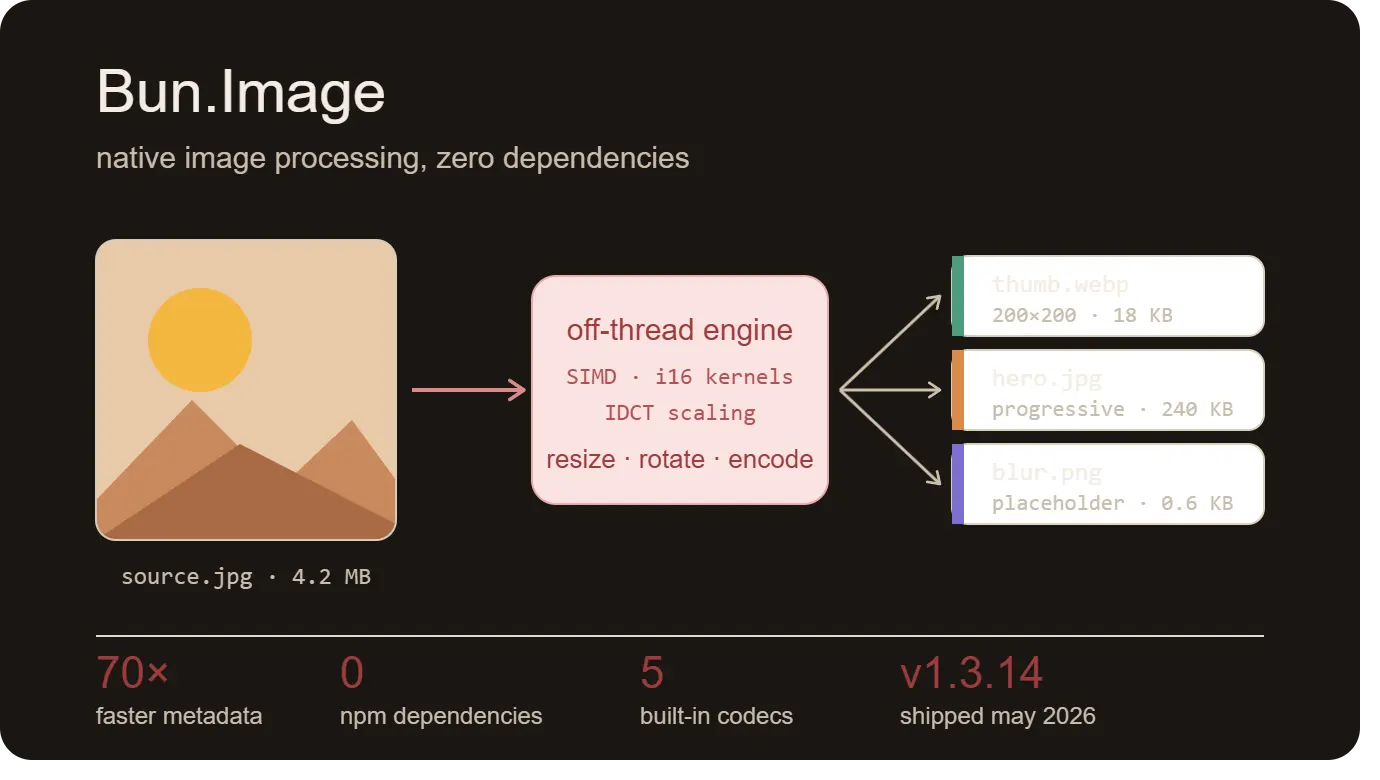
On May 13, 2026, Bun shipped v1.3.14 with `Bun.Image` - a built-in image pipeline that does most of what sharp does, with no npm dependency, no `node-gyp`, no native addon, and no install-time compile step. The codecs are statically linked into the Bun binary on Linux and Windows; on macOS, the system's ImageIO does the work for the formats that need it. The whole thing runs off the JavaScript thread, ships with a sharp-style fluent API, and lands a modest performance lead on the benchmarks Bun itself published.
This is the same architectural bet Bun has been making for two years - SQL, S3, Redis, and now Image - that the right place for these capabilities is the runtime, not a constellation of npm packages with C dependencies. Here is what `Bun.Image` actually ships in v1.3.14, where it earns the comparison to sharp, and where the gaps are honest.
What the API actually does
The API is a lazy, chainable pipeline. You construct from an input, chain transforms, pick an output format, then `await` a terminal method. Nothing actually runs until you await something. The whole sequence executes off the JavaScript thread except for `metadata()`, which is a synchronous header read.
A typical use case looks like this:
Constructors accept a path string, a `Buffer` / `ArrayBuffer` / `TypedArray`, a `Blob`, a `BunFile` (via `Bun.file()`), an `S3File` (via `Bun.s3()`), or a `data:` URL. The `Blob` prototype gets a shorthand `.image()` method. Format is sniffed from the bytes - extensions and `Content-Type` are ignored. Terminal methods are `bytes()`, `buffer()`, `blob()`, `toBase64()`, `dataurl()`, `placeholder()`, `metadata()`, and `write(dest)`.
There is a `maxPixels` cap to defuse decompression-bomb attacks. The default in the documentation is written as `4096 * 4096`, which is 16,777,216 pixels - about 16.8 megapixels. A comment in the same docs example claims this matches "Sharp's ~268 MP default," but the literal value evaluates to 16.8 MP, not 268 MP. The two numbers in the docs contradict each other; read the runtime, not the comment, and for any endpoint that accepts user uploads, set `maxPixels` to whatever your actual upper bound is rather than trusting either default.
Static codecs, OS backends, and the Linux gap
The codec strategy is split. JPEG, PNG, WebP, GIF, and BMP go through statically linked codecs - libjpeg-turbo, spng, and libwebp - embedded directly in the Bun binary. These produce byte-identical output across every platform Bun supports. HEIC, AVIF, and TIFF go through the operating system: ImageIO and vImage on macOS, Windows Imaging Component (with the optional HEIF and AV1 Video Extensions) on Windows.
On Linux there is no OS image framework to call into, so HEIC, AVIF, and TIFF return `ERR_IMAGE_FORMAT_UNSUPPORTED`. AVIF encoding is even narrower: it requires Apple's hardware AV1 encoder, which exists only on M3 and later silicon. Intel Macs and M1/M2 reject AVIF encode with the same error code; AVIF decode works wherever ImageIO does (macOS 13+).
| Format | macOS | Windows | Linux |
|---|---|---|---|
| JPEG / PNG / WebP / GIF / BMP | Static codec | Static codec | Static codec |
| HEIC / HEIF | ImageIO + vImage | WIC + HEIF ext. | Not supported |
| AVIF (decode) | ImageIO (macOS 13+) | WIC + AV1 ext. | Not supported |
| AVIF (encode) | M3+ only | AV1 Video ext. | Not supported |
| TIFF | ImageIO | WIC | Not supported |
| SVG / JPEG XL | Not supported | Not supported | Not supported |
ERR_IMAGE_FORMAT_UNSUPPORTED.For most server-side Node-to-Bun migrations this matters. If your production target is Linux x64 (which it almost certainly is) and you serve iPhone uploads, you cannot decode HEIC with Bun.Image today. You either keep a sharp-with-libheif sidecar, or you push the decode into the client (the route ImgShifter takes - the HEIC to JPG converter decodes via a WebAssembly module in the browser, so the server never has to see the original HEIC). The trade-off goes both ways.
There is a backend override: `Bun.Image.backend = "bun"` forces the portable, Highway-SIMD geometry path that produces byte-identical output to the Linux build. The default on macOS and Windows is `"system"`. The setting is process-global and read at task scheduling time. This is the escape hatch for reproducibility-critical workflows where you want the same pixels regardless of where the code runs.
Resize, filters, and the Magic Kernel
The resize step takes the standard width/height pair plus a `fit` option. The two `fit` modes documented in the official table are `"fill"` (default, stretch to exact dimensions) and `"inside"` (preserve aspect ratio, fit within the box). A `withoutEnlargement: true` flag prevents upscaling. The wider sharp-compatible set of fit modes - `cover`, `contain`, `outside` - is not listed in the public docs as of v1.3.14, so don't assume direct sharp portability there.
The filter set is unusually deep for a built-in. The default is `lanczos3`. The full list also includes `lanczos2`, `mitchell`, `cubic` (Catmull-Rom), `mks2013` and `mks2021`, `bilinear`/`linear`, `box`, and `nearest`. The `mks` filters are Magic Kernel Sharp - John Costella's resizing kernel that Facebook deployed for back-end image resizing in 2013 and Instagram extended in 2015. It is the same filter most people have been admiring on Facebook and Instagram thumbnails for a decade without knowing the name.
Rotation is restricted to 90-degree multiples: `rotate(90)`, `rotate(180)`, `rotate(270)`. There is no arbitrary-angle rotate in v1.3.14. `flip()` mirrors vertically (about the x-axis), `flop()` mirrors horizontally (about the y-axis), and `modulate({ brightness, saturation })` does basic colour adjustment.
Encoders worth knowing about
JPEG encoding takes the obvious options: `quality`, `progressive: true` for progressive scan, and a few quantisation-table knobs. PNG encoding has a quietly excellent option: `palette: true` with a `colors: 64` cap and Floyd-Steinberg dithering. The docs note that quantised PNGs are typically 3 to 5 times smaller than truecolor for screenshots and UI assets - if you are shipping PNG screenshots in API responses or generating chart thumbnails, this is a free 60-80 percent payload cut.
The `.placeholder()` terminal is the most interesting one. The docs describe it as a ThumbHash render, returning a 32-pixel-or-smaller blur encoded as a `data:` URL in roughly 400-700 bytes - small enough to inline directly into HTML. In practice, the implementation has been reported to emit a PNG data URL of around 1,700 bytes for real test images, well above the documented size envelope. That issue is open and tracked - what ships in v1.3.14 is closer to a small inline PNG than to a true ThumbHash. The right pattern remains correct, the byte count needs another release or two.
The benchmarks - with the methodology disclosed
Bun's v1.3.14 release post publishes a benchmark table against sharp 0.34.5 on Linux x64 with 50 iterations per case. The headline numbers are 1.20-1.38× on real conversions and a single 70× outlier on `metadata()`. Here are the verbatim figures:
Linux x64, 50 iterations per case, sharp.concurrency(1) — which is sharp's documented default on glibc-Linux without jemalloc. Figures published by Bun in the v1.3.14 release post.
- 1080p PNG → 400×400 → JPEG1.38× faster
Thumbnail-style downscale
28.6 ms39.5 ms - 1080p PNG → 800×600 → WebP1.33× faster
Format conversion + resize
82.7 ms110.1 ms - 4K JPEG → 800×450 → JPEG1.27× faster
Hero-strip generation
35.8 ms45.5 ms - 4K JPEG → 1920×1080 → JPEG1.22× faster
4K to 1080p downscale
57.2 ms69.9 ms - 12 MP JPEG → 1024×768 → WebP1.20× faster
Phone-camera to web-ready
138 ms165 ms
metadata() — 70× faster
Bun reads 0.004 ms; sharp reads 0.28 ms. The gap is architecturally credible — metadata() is a header-only read on Bun's side versus a pixel-buffer initialisation on sharp's. Excluded from the bars above because it would compress every other bar to invisibility.
One detail worth surfacing. The benchmark runs with `sharp.concurrency(1)`. Per sharp's own API documentation: "The default value is the number of CPU cores, except when using glibc-based Linux without jemalloc, where the default is 1 to help reduce memory fragmentation." So `sharp.concurrency(1)` on Linux x64 is reproducing sharp's documented default for that platform - it is not an imposed handicap. On musl-Linux (Alpine) or other libc/allocator combinations, sharp will use more cores by default, and a re-run of the benchmark on those platforms might show different deltas.
The 1.20-1.38× range is modest. It is the kind of win that compounds when you process thousands of images per minute, but it is not the kind of generational jump that decides a stack rewrite by itself. The interesting number is the 70× `metadata()` delta - that one is architecturally credible because Bun's `metadata()` is a header-only read, while sharp's equivalent initialises a pixel buffer. If your workload is dominated by "check the dimensions before deciding whether to process," Bun gives you that essentially free.
Bun cites four specific hardware optimisations in the release post: i16 fixed-point SIMD resize kernels, JPEG IDCT scaling to the smallest sufficient size, zero-copy ArrayBuffer borrowing, and a single pre-allocated arena for resize scratch memory. The JPEG IDCT short-circuit is the one worth understanding - when you ask for a thumbnail no larger than half the source dimensions, the JPEG decoder skips to the nearest M/8 IDCT scale during decode and never materialises the full-resolution buffer. Generating a thumbnail from a 24 MP camera JPEG never touches all 24 million pixels.
The honest limitations
Five gaps worth knowing before you migrate a production image pipeline.
- No SVG. The format does not appear in the docs' supported formats list. There is no Bun.Image.svg() and no path-tracing primitive. SVG rasterisation still needs a separate library on the server, or a browser tool like ImgShifter's SVG to PNG and SVG to WEBP converters on the client.
- No JPEG XL. Bun reads regular JPEG, not JPEG XL. The community has asked - the v1.3.14 release discussion on GitHub contains an explicit user complaint about the omission - but no JXL support has been announced.
- No arbitrary-angle rotation. Only 90, 180, and 270 degrees. If you need 7.5-degree compensation for a scanned document, you need a different library.
- Linux has no HEIC, AVIF, or TIFF. This is the biggest gap for most production deployments, since most servers are Linux. The ERR_IMAGE_FORMAT_UNSUPPORTED error code is the documented try/catch surface for those formats.
- The placeholder() output is larger than the docs claim. The implementation works, but the file size currently sits above the documented 400-700 byte envelope - tracked in an open GitHub issue against v1.3.14.
The relevant GitHub references are linked at the bottom of this post: the v1.3.14 release discussion for the JPEG XL ask, and issue #30198 for the placeholder size. For SVG on the browser side, the converters live at SVG to PNG and SVG to WEBP.
The bundle-size argument, with the actual numbers
One of the strongest pitches for Bun.Image is the Docker image footprint. A typical Node image with sharp pulled through `node-gyp` and the libvips chain commonly lands between 200 and 400 MB. Bun, with the image codecs already inside the runtime, ships much smaller. Compressed image sizes on Docker Hub for `oven/bun:canary` on linux/amd64 (May 2026):
| Variant | Compressed size | What you get |
|---|---|---|
| oven/bun:canary (debian) | 82 MB | Full runtime + image codecs + most native tools |
| oven/bun:canary-slim | 63 MB | Trimmed Debian, image codecs included |
| oven/bun:canary-alpine | 41 MB | musl-based, image codecs included |
| oven/bun:canary-distroless | 41 MB | No shell, no package manager, ship-this-to-prod |
For an Alpine deployment that previously hit the `node-gyp` + libvips wall, going from 250+ MB to 41 MB compressed is the kind of saving that genuinely changes deployment economics - cold start, cache pressure, pull time on autoscaling clusters.
Where it fits with web frameworks
A `Bun.Image` pipeline is a valid `Response` body and sets `Content-Type` automatically. That is the integration story for any framework built on `Bun.serve` - including Elysia and Hono. There is no first-party Elysia plugin (don't let any blog post tell you there is); you just return the pipeline.
One nuance the docs flag: `new Response(img)` currently runs the encode synchronously during body init. The recommended pattern is to await a terminal first (`.bytes()` or `.blob()`) and pass the result, which keeps the encode off the JavaScript thread.
Batteries-included, or runtime bloat?
There is a real debate every time Bun adds another batteries-included primitive. Some of it is on the Hacker News thread for Bun 1.2 - one commenter argued: *"There are many databases out there, should there be drivers for half of them? Even at that level it's a lot of added code which means slower executable."* The same argument applies to image processing. Why is a JPEG encoder in the JavaScript runtime?
The counter-argument is the install ritual at the top of this post. Sharp installs cleanly on most platforms, but the long tail of "installs cleanly on 95% of platforms" is where engineering hours go to die. Bun's bet is that the few megabytes of static codecs are a fair price for never having to debug a `node-gyp` failure again. Whether that bet is right depends on whether your team has ever lost a day to it. If yes, Bun.Image looks like a refund. If no, sharp still works fine.
Where this leaves image tooling outside the browser
Server-side image processing has had two serious options for years - sharp (fast, but with the native-addon tax) and ImageMagick (universal, but slow and historically a security exposure surface). Bun.Image is the first credible third option that ships without the install pain of either. It is not yet a sharp replacement - the Linux HEIC/AVIF/TIFF gap is real, SVG is missing, the placeholder feature needs another release - but the trajectory is clear. By v1.4 or v1.5, most of those gaps will probably close.
The other path, of course, is to do the work in the browser and not have a server image pipeline at all. That is the bet ImgShifter makes - the Canvas API plus WebAssembly modules (`heic-to`, `libraw-wasm`, and the `@jsquash` codecs) handle the same JPEG, PNG, WebP, AVIF, HEIC, and SVG workflows entirely on the user's device. No Docker image to size, no `node-gyp` to debug, no upload to lose sleep over. The two approaches are complementary: Bun.Image is the right tool when the server has to do the work (batch processing, API thumbnails, CMS pipelines). Browser-side conversion is the right tool when the user's device can do it and the file is private. The interesting thing about 2026 is that both options finally exist.
Server-side or browser-side, pick the one that fits the job
Bun.Image is the right tool when the server has to do the work. ImgShifter is the right tool when the user's device can do it and the file is private. The browser converters run entirely client-side via the Canvas API and WebAssembly.
Related articles
WebP vs. JPEG vs. PNG vs. AVIF: Which Image Format Should You Actually Use?
JPEG, PNG, WebP, and AVIF compared in plain English — what each format does well, what it breaks on, where browser support stands in 2026, and which one to actually ship for photos, graphics, and the web.
9 min read
The 2026 State of Web Graphics: PNG Is Out, AVIF and SVG Are In
Legacy PNG and JPEG are quietly being replaced by AVIF, WebP, and inline SVG. A data-driven look at why the migration is happening, how the formats actually differ at render time, and what to ship in 2026.
11 min read